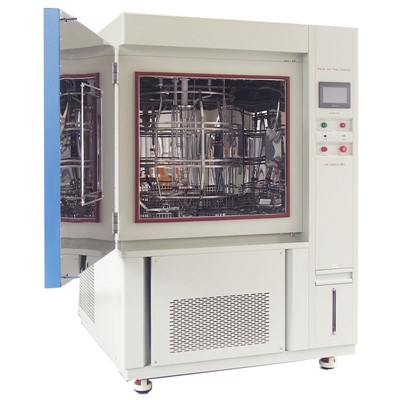


As a trusted supplier of Mini Temperature Chambers, I understand the importance of ensuring these specialized devices operate smoothly. Mini Temperature Chambers are crucial for a wide range of applications, from electronics testing to pharmaceutical research. However, like any sophisticated equipment, they can encounter common problems. In this blog, I'll share some practical tips on how to troubleshoot these issues effectively.
1. Temperature Fluctuations
One of the most common problems users face with Mini Temperature Chambers is temperature fluctuations. Instead of maintaining a stable set - point, the internal temperature may vary erratically.


- Check the Door Seal: A faulty door seal can allow warm or cold air to leak in or out, causing temperature instability. Inspect the seal for any visible signs of wear, such as cracks or tears. If you find damage, consider replacing the seal. Our Mini Temperature Humidity Environmental Control Chamber is designed with high - quality door seals, but over time, they may still need replacement.
- Air Circulation: Poor air circulation within the chamber can lead to uneven temperature distribution. Examine the internal fans to ensure they are clean and functioning properly. Dust or debris can accumulate on the fan blades, reducing their efficiency. Use a soft brush or compressed air to clean the fans gently.
2. Inability to Reach Set Temperature
Another frequent issue is the chamber's failure to reach the desired temperature. This can be a significant setback for experiments or testing processes that rely on specific temperature conditions.
- Refrigeration System: The refrigeration system is a key component in achieving low temperatures. Check the compressor and condenser for any signs of malfunction. If the compressor is not running, it could be due to a faulty compressor relay or a problem with the power supply. Consult the user manual for your Desktop Cold Heat Humidity Climatic Test Machine to understand the proper troubleshooting steps for the refrigeration system.
- Heating Element: For higher temperature settings, the heating element is responsible. A damaged heating element will prevent the chamber from reaching elevated temperatures. You can use a multimeter to test the continuity of the heating element. If there is no continuity, the heating element may need to be replaced.
3. Humidity Issues
In chambers that also control humidity, problems with humidity levels can occur. These can include inaccurate humidity readings or the inability to maintain the set humidity.
- Humidifier and Dehumidifier: The humidifier adds moisture to the chamber, while the dehumidifier removes it. Check the water level in the humidifier reservoir. If it is empty, fill it with distilled water. For the dehumidifier, ensure that the drain line is not blocked. A blocked drain line can prevent the proper removal of moisture, leading to high - humidity levels in the chamber. Our Small Temperature Humidity Chamber is equipped with reliable humidification and dehumidification systems, but regular maintenance is essential.
- Humidity Sensor: A malfunctioning humidity sensor can provide inaccurate readings. Calibrate the humidity sensor according to the manufacturer's instructions. If calibration does not resolve the issue, the sensor may need to be replaced.
4. Error Codes on the Control Panel
Modern Mini Temperature Chambers are equipped with control panels that display error codes when something goes wrong. These error codes are valuable diagnostic tools.
- Refer to the Manual: The first step when you see an error code is to consult the user manual. The manual will usually have a list of error codes and their corresponding solutions. For example, an error code related to a communication problem between components may indicate a loose connection or a faulty cable.
- Contact Technical Support: If you are unable to resolve the issue based on the information in the manual, it's time to contact our technical support team. We have a team of experts who are well - versed in troubleshooting Mini Temperature Chambers and can provide you with personalized assistance.
5. Noise and Vibration
Excessive noise and vibration during the operation of the chamber can be a sign of a problem.
- Mounting and Installation: Ensure that the chamber is properly installed and mounted on a stable surface. Uneven or unstable surfaces can cause the chamber to vibrate, which in turn can lead to additional noise. Our installation guides provide detailed instructions on how to properly install the Mini Temperature Humidity Environmental Control Chamber to minimize noise and vibration.
- Mechanical Components: Check the moving mechanical components, such as the compressor and fans, for any signs of damage or misalignment. A loose or damaged fan blade can create excessive noise. Tighten any loose bolts or replace damaged components as needed.
6. Power and Electrical Problems
Power - related issues can prevent the chamber from operating altogether.
- Power Supply: Check the power cord to ensure it is properly plugged into a functioning outlet. Use a multimeter to test the voltage at the outlet to ensure it is within the recommended range for the chamber. A power surge protector can also help protect the chamber from electrical damage.
- Circuit Breakers and Fuses: If the chamber suddenly stops working, check the circuit breaker or fuse box. A tripped circuit breaker or a blown fuse can cut off the power supply to the chamber. Reset the circuit breaker or replace the fuse if necessary.
7. Regular Maintenance and Preventive Measures
To minimize the occurrence of problems, regular maintenance is essential.
- Cleaning: Periodically clean the interior and exterior of the chamber. Use a mild detergent and a soft cloth to clean the surfaces. Remove any dust, debris, or contaminants from the air filters, fans, and other components.
- Filter Replacement: Replace the air filters at regular intervals. Clogged air filters can reduce air circulation and affect the performance of the chamber.
- Calibration: Schedule regular calibration of the temperature and humidity sensors. This ensures accurate readings and reliable operation of the chamber.
Conclusion
Troubleshooting common problems in a Mini Temperature Chamber requires a systematic approach. By following the tips outlined in this blog, you can identify and resolve many of the issues that may arise. However, if you encounter persistent problems or are unsure about how to proceed, don't hesitate to contact us. As a leading supplier of Mini Temperature Chambers, we are committed to providing you with the best products and support. Whether you need assistance with troubleshooting, maintenance, or are interested in purchasing a new chamber, we are here to help. Reach out to us to discuss your specific needs and explore how our Mini Temperature Humidity Environmental Control Chamber, Desktop Cold Heat Humidity Climatic Test Machine, or Small Temperature Humidity Chamber can meet your requirements.
References
- Manufacturer's user manuals for Mini Temperature Chambers
- Industry standards and guidelines for environmental testing equipment